A business messenger for small business should do more than move conversations out of email. It should help a team decide what needs attention, assign the next step, protect business information, and switch from text to a call when typing creates more confusion.
That distinction matters because another stream of notifications does not automatically improve communication. Microsoft found that high-volume Microsoft 365 users were interrupted every two minutes during core work hours by meetings, email, or chat. The answer is not more messages. It is a clearer operating system for communication. Source
This guide shows seven practical workflows small businesses can use to turn a team messaging app into a dependable part of daily operations. The examples apply to law firms, clinics, real estate teams, hospitality businesses, field services, and other teams that run on calls, appointments, files, and fast handoffs. Simple rules solve most of the problem.
What Is a Business Messenger?
A business messenger is a private communication workspace built for employees, contractors, partners, and customers. Unlike a consumer chat app, it should give a company control over work conversations, shared files, access, tasks, calls, and account privacy.
The most useful business messengers combine several communication modes:
| Communication need | Best mode | Example |
|---|---|---|
| Quick update | Direct message | “The client approved the revised appointment time.” |
| Ongoing team coordination | Group chat | Coordinate a property showing or service visit |
| Formal announcement | Broadcast channel | Publish a new policy or office update |
| Clear ownership | Task | Assign a follow-up with a deadline |
| Sensitive or nuanced issue | Voice or video call | Resolve a client complaint or explain a complex change |
| External contact | Business call or SMS | Confirm an appointment with someone outside the app |
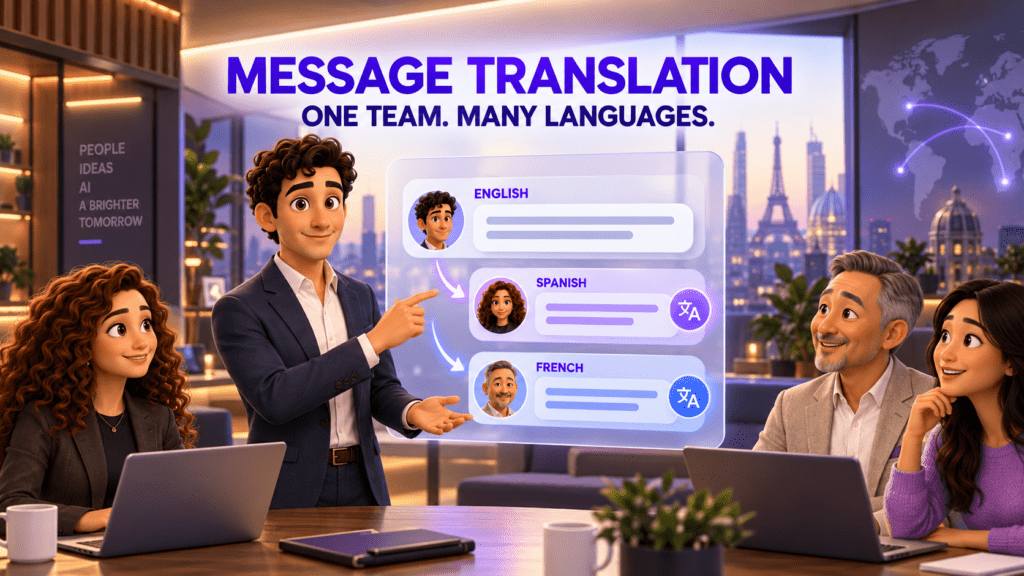
| Multilingual communication | Automatic translation | Coordinate with a client or partner in another language |
The goal is not to keep every interaction in text. The goal is to keep the context, people, and next action connected.
1. Separate Business Communication From Personal Noise
Many small teams start with whatever employees already have on their phones. That feels convenient until work chats compete with family groups, social notifications, and personal contacts.
A dedicated business workspace creates a simple rule: if a notification appears there, it relates to work. Employees no longer need to search a personal messenger for a customer address, contract photo, or shift update. Owners also avoid building company processes around accounts they do not control.
Use this workflow:
- Create one company workspace for employees and approved partners.
- Move active work conversations into that workspace.
- Set a naming standard for group chats, such as
Client - Project - Purpose. - Pin only the conversations that require current attention.
- Set clear expectations for response times and after-hours messages.
For example, a real estate team could keep one group for each active property. The agent, coordinator, photographer, and contractor see the same updates without mixing the seller’s documents into personal chats.
JotLink Messenger is designed as an invitation-only business workspace. Accounts can use a virtual login, allowing users to keep a personal phone number private unless they choose to share it.
Actionable takeaway: Write a one-page messaging policy before inviting the full team. Define which conversations belong in direct messages, group chats, tasks, calls, and broadcast channels.
2. Turn Decisions in Chat Into Assigned Tasks
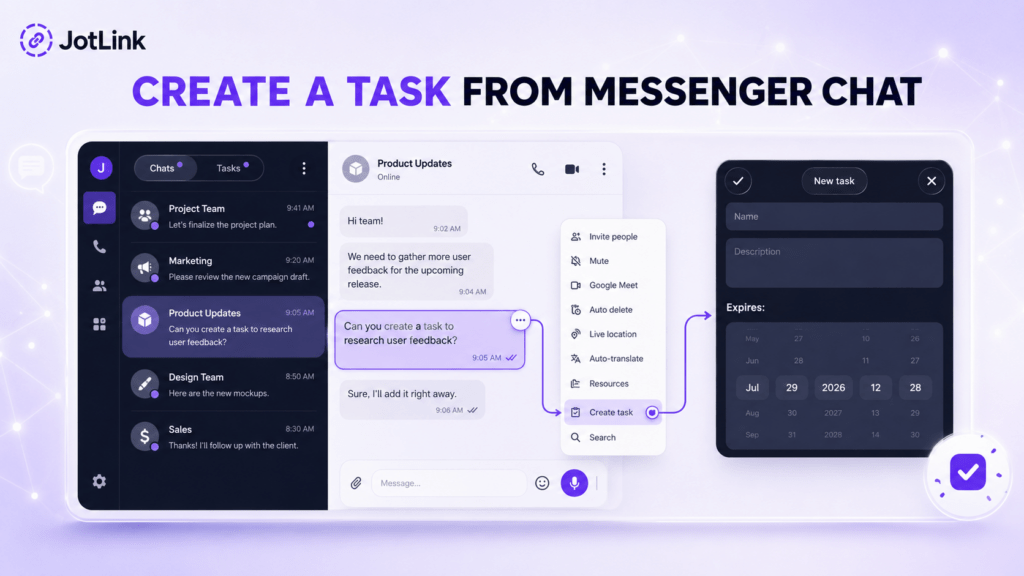
Chat is good for reaching a decision, but it is a poor place to store responsibility. A sentence such as “Someone should call the client tomorrow” can disappear under twenty newer messages.
The fix is to separate the discussion from the commitment. When a conversation produces an action, convert it into a task with four fields:
- A specific outcome
- One owner
- A deadline
- The original context
Consider a law firm handling a new inquiry. The chat may include the prospect’s preferred time, the practice area, and a note about urgency. Once the team agrees that the inquiry deserves a callback, the intake coordinator creates a task: “Call prospect to schedule a 20-minute consultation,” assigns it to one person, and sets a deadline for 2:00 p.m.
This small step eliminates two common failures. First, everyone no longer assumes someone else will handle the request. Second, the person doing the work does not need to reconstruct the reason for it.
JotLink allows teams to create tasks directly from a chat, add assignees and deadlines, and track them in a dedicated Tasks section. The conversation remains available, but the commitment no longer depends on someone remembering a message.
Actionable takeaway: Adopt a “decision plus owner” rule. Any chat decision that requires future work becomes an assigned task before the conversation ends.
3. Match the Communication Mode to the Message
Not every issue should become a meeting, and not every issue should remain a text thread.
Written messages work well for simple updates, links, files, and decisions that need a record. They work less well when the topic is emotional, ambiguous, urgent, or technically complex. Atlassian reported that nearly nine in ten surveyed workers regularly spend time interpreting vague written messages. In the same research, 70% said a short recorded video could have prevented their most recent miscommunication. Source
Give employees a simple escalation rule:
- Use text for facts, status updates, and questions that can be answered in a few lines.
- Use a voice note when tone matters but an immediate response does not.
- Start a call when a thread has produced three rounds of clarification.
- Use video when showing a process is faster than describing it.
- Create a task when the discussion ends with future work.
Imagine a clinic’s front-desk team discussing a scheduling exception. A short message can communicate the new appointment time. A sensitive patient complaint, however, should move to a voice call with the appropriate staff member instead of becoming a long, easily misunderstood group thread.
JotLink supports internal voice and video calls, group calls, call transfers, voice notes, and file sharing within the same workspace. Teams can change the communication mode without moving the discussion to an unrelated app.
Actionable takeaway: Add a three-message rule to your team policy. If a clarification thread goes back and forth three times, switch to voice or video and summarize the decision in writing afterward.
4. Build Repeatable Handoff Workflows
Small businesses lose information at the gaps between people and tools. A lead arrives in one app, a manager asks a question in another, an employee calls from a personal number, and the final update never reaches the person responsible for the next step.
A business messenger can make the handoff visible when teams use a consistent pattern:
- State what happened.
- Attach the relevant file, message, or customer context.
- Name the next action.
- Assign an owner.
- Confirm completion in the same thread.
Here is a field-service example:
- The office receives a customer request.
- A coordinator creates a service group and adds the assigned technician.
- The address, access instructions, and photos are shared in the group.
- The technician shares live location or an estimated arrival time.
- After the visit, the technician uploads completion photos.
- The coordinator confirms the next customer communication and closes the task.
The same structure works for a hotel maintenance request, a property showing, or a home-care visit. The workflow is simple enough to repeat, while the record makes it easier to see where a delay occurred.
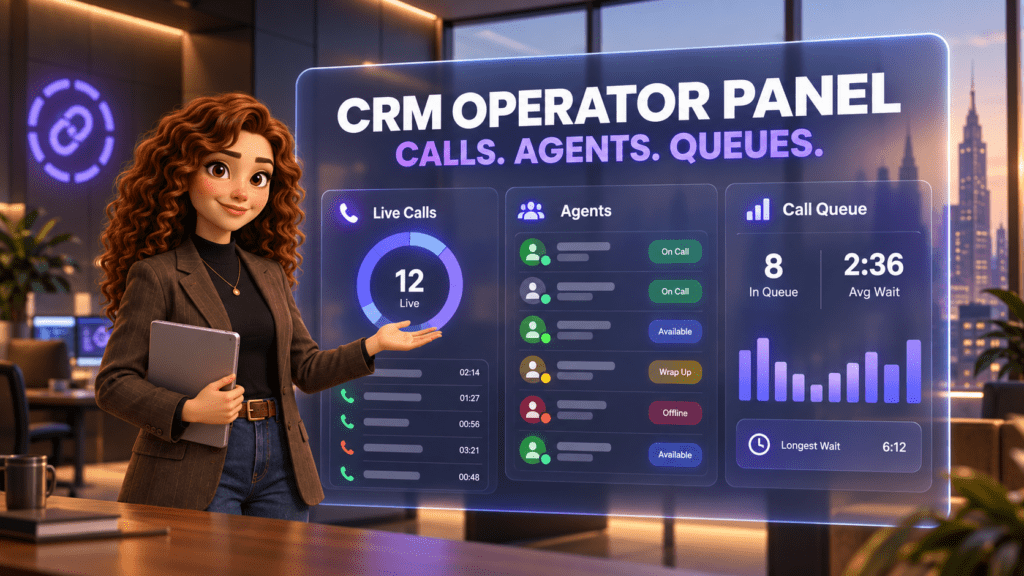
Teams that need more formal customer history can connect the communication layer to a small business CRM. Teams with queues, extensions, or advanced routing can add cloud business telephony without replacing the Messenger workspace.
Actionable takeaway: Choose one high-frequency handoff this week. Document its five steps, test it with one team, and revise the workflow before expanding it.
5. Coordinate Multilingual Teams Without Copy-Paste Translation
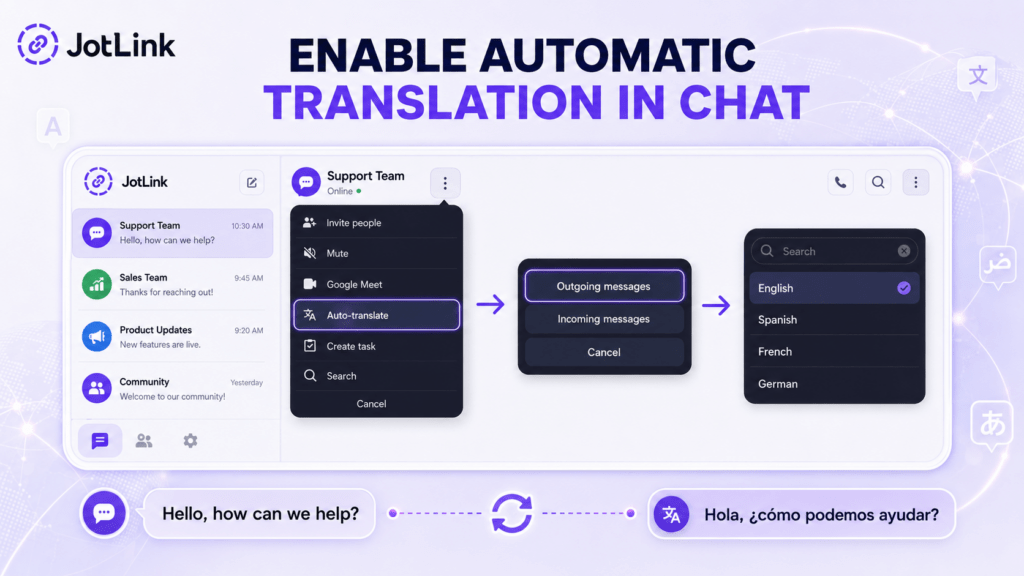
Multilingual communication often creates hidden delays. Someone copies a message into a translation tool, switches back to the chat, pastes a response, and hopes the wording still reflects the original meaning.
Automatic translation inside the conversation removes several of those steps. It can help:
- A contractor read site instructions in their preferred language
- A hospitality team publish one update to multilingual staff
- A real estate agent communicate with an international buyer
- A support team respond to a customer without opening a separate translation app
JotLink Messenger supports automatic two-way translation in more than 70 languages for personal and group chats. Broadcast channels can also deliver a post in each subscriber’s preferred language.
Translation still needs human judgment. Legal terms, medical instructions, pricing, and contractual commitments should be reviewed by a qualified person when accuracy carries material risk. The tool should reduce routine language friction, not replace professional interpretation where it is required.
Actionable takeaway: Start with low-risk internal updates, such as schedules or operational notices. Create a review rule for sensitive or binding information.
6. Protect Conversations, Accounts, and Customer Information
Security is an operational requirement, not a feature to check once during setup. A business messenger may contain customer details, internal files, live locations, call records, and commercial discussions.
CISA guidance recommends end-to-end encryption to the maximum extent possible for communications traffic. Small businesses should also evaluate how a messaging platform handles account access, personal phone numbers, devices, former employees, and sensitive chat history.
Use this evaluation checklist:
- Are messages, files, voice notes, and calls end-to-end encrypted?
- Is encryption enabled by default?
- Can users keep personal phone numbers private?
- Can the company control who enters a group?
- Can sensitive conversations use auto-delete rules?
- Can a user access the same account securely across approved devices?
- Is there a clear offboarding process when someone leaves?
- Do employees know what information should never be posted in chat?
JotLink states that its messages, files, voice notes, and calls use end-to-end encryption by default. It also offers invitation-based access, hidden chats protected by a PIN, optional auto-delete timers, and anonymous groups where participants do not see one another’s contact information.
Encryption does not replace governance. Regulated businesses should review their legal, privacy, retention, and access-control requirements before using any communication tool for sensitive data.
Actionable takeaway: Add messaging access to the employee onboarding and offboarding checklist. Remove former team members promptly, review active groups, and document retention rules.
7. Keep Field and Traveling Teams Connected
Field teams rarely work from one device or one reliable location. They move between a phone, desktop, vehicle, customer site, and temporary network. Communication breaks down when the latest file is on one device, the work chat is on another, and the business number exists only at the office.
A practical field workflow combines:
- Synchronized chats across mobile and desktop
- Business calls and SMS from the same app
- File and photo sharing
- Live location when the work requires it
- A business identity that does not expose an employee’s personal number
- Optional mobile data for international travel
For example, a property manager can receive a maintenance request on desktop, assign it to a technician, share access instructions, and monitor the visit from the same conversation. The technician can upload photos from mobile, while the office keeps a complete record of the handoff.
JotLink Messenger works across iOS, Android, Windows, and macOS, with simultaneous device access. Optional external calls, SMS, virtual numbers, and business eSIM data plans can extend the workflow beyond internal messaging. These paid services are separate from the free core Messenger features.
Actionable takeaway: Test one real field workflow from start to finish on both mobile and desktop. Look for any step that still requires a personal account, a manual copy-paste, or a separate status call.
A 30-Day Business Messenger Rollout Plan
Do not move every team and process on day one. A phased rollout makes it easier to establish rules and measure whether the new workflow is actually better.
Week 1: Map the Communication
List the channels employees currently use for work. Include personal messengers, email, phone calls, shared drives, spreadsheets, and task tools. Identify where messages, files, and ownership are most often lost.
Week 2: Pilot One Workflow
Choose one team and one repeatable process, such as appointment confirmation, property showing coordination, or service dispatch. Set up the relevant group, naming rule, task pattern, and escalation rule.
Week 3: Measure Friction
Track a few practical signals:
- How many follow-up messages are needed to clarify a task?
- How many assignments miss an owner or deadline?
- How often does the team switch to another app?
- How long does a handoff take?
- Are employees still using personal accounts for business?
Week 4: Standardize and Expand
Fix the workflow based on the pilot. Write a short policy, train the next team, and remove duplicate channels where appropriate. Keep the rollout focused on fewer missed tasks and cleaner handoffs, not message volume.
How to Choose a Business Messenger for Small Business
Before selecting a platform, run one of your real workflows through it. A feature checklist can look impressive while the daily experience remains fragmented.
Ask these questions:
- Can the tool keep work separate from personal conversations?
- Can a message become an assigned task without losing context?
- Can the team move from chat to a call without switching products?
- Does it support the devices employees actually use?
- Can it communicate with people outside the app through calls or SMS?
- Does it support multilingual communication?
- Are messages, files, and calls protected by default?
- Can it grow into telephony or CRM workflows without rebuilding the communication stack?
- What is included for free, and which external services cost extra?
- Can an owner explain the rollout rules in one page?
The best business messenger for small business teams is not the one with the longest feature list. It is the one your team can use consistently to make decisions, assign work, and preserve context.
Frequently Asked Questions
What Is the Difference Between a Business Messenger and a Consumer Messenger?
A business messenger creates a dedicated workspace for company communication and may include access controls, tasks, business calls, file management, translation, and account privacy. Consumer messengers are primarily designed around personal contacts and social communication.
Can a Business Messenger Replace Email?
It can replace many internal updates, quick questions, file handoffs, and routine coordination. Email may still be appropriate for formal external correspondence, long documents, or communication that must follow a specific archival process.
Should Small Businesses Use a Free Team Messaging App?
A free core product can be a practical starting point, but review what is included. JotLink Messenger includes internal chats, voice and video calls, file sharing, tasks, and encryption at no cost. External calls, SMS, virtual numbers, and eSIM plans are optional paid services.
Is a Secure Business Messenger Enough for Regulated Work?
Encryption and access controls are important, but they do not automatically satisfy every legal or industry requirement. A regulated business should review vendor terms, retention, permissions, staff procedures, and applicable compliance obligations.
How Do You Stop a Business Messenger From Becoming Another Noisy Inbox?
Set rules for group naming, message urgency, task creation, after-hours communication, and when to switch from text to a call. Review unused groups regularly and avoid copying every person into every conversation.
Make Messaging Part of the Workflow
A business messenger creates value when it reduces ambiguity, not when it increases activity. Separate work from personal noise, convert decisions into tasks, use the right communication mode, and keep each handoff visible from request to completion. Keep the rules clear. Keep ownership visible.
Start with one workflow and one team. Once the process is reliable, expand it.
Start with JotLink Messenger free to bring secure chats, internal calls, file sharing, tasks, and multilingual communication into one business workspace.
Sources