Your flight lands, the airport Wi-Fi is slow, and your rideshare app needs a connection before you can leave the terminal. This is exactly the moment when a travel eSIM earns its place on your phone.
A travel eSIM gives an unlocked, compatible phone access to a mobile data plan in another country without replacing the physical SIM card. You can usually buy the plan online, install it before departure, and switch it on when you arrive.
For US business travelers, the real advantage is not only convenience. A well-planned eSIM setup can keep work apps online while your regular number remains available for calls, texts, and verification codes.
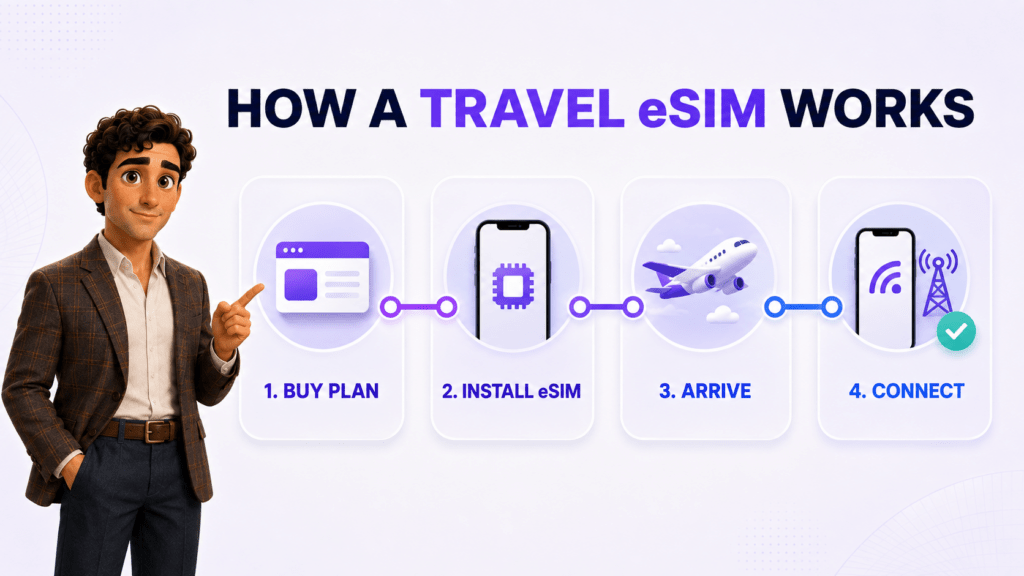
Short answer: A travel eSIM is a downloadable cellular plan for use outside your home network. It works through a digital SIM already built into a compatible device. After you purchase a plan, you install the provider profile, select it for mobile data, and connect to a supported local network at your destination.
What is a travel eSIM?
An eSIM, or embedded SIM, is a programmable component built into a phone, tablet, or other connected device. It performs the basic job of a removable SIM card, but the carrier profile is installed digitally.
A travel eSIM is a plan designed for temporary or recurring use away from your home country. Depending on the provider, it may cover one country, a region such as Europe, or a large group of destinations under one global plan.
Most travel eSIMs focus on mobile data. That means email, maps, browsers, cloud tools, messaging apps, and internet-based calling can work through the plan, but ordinary carrier calls and SMS may not be included. Some providers also offer plans with a phone number, calling minutes, or text messages, so the inclusions need to be checked before purchase.
The eSIM itself is not an app and it is not Wi-Fi. It is a digital way to provision cellular service on a device. Once activated, it connects to partner mobile networks much like a physical SIM would.
How does a travel eSIM work?
The process has four main stages: choose a plan, install the eSIM profile, configure the phone, and connect at the destination.
1. Choose the coverage and data allowance
Start with the countries on your itinerary. A single-country plan can be economical for one destination, while a regional or global plan may be easier for a multi-country trip. Check the data amount, validity period, supported networks, hotspot policy, and whether the plan is data-only.
2. Purchase and install the eSIM
After purchase, the provider usually supplies a QR code, an activation link, or an in-app installation process. Install the profile while you still have dependable internet access. Apple notes that an iPhone generally needs Wi-Fi or a hotspot during setup, although some models and regions support activation without it.
3. Label the two lines clearly
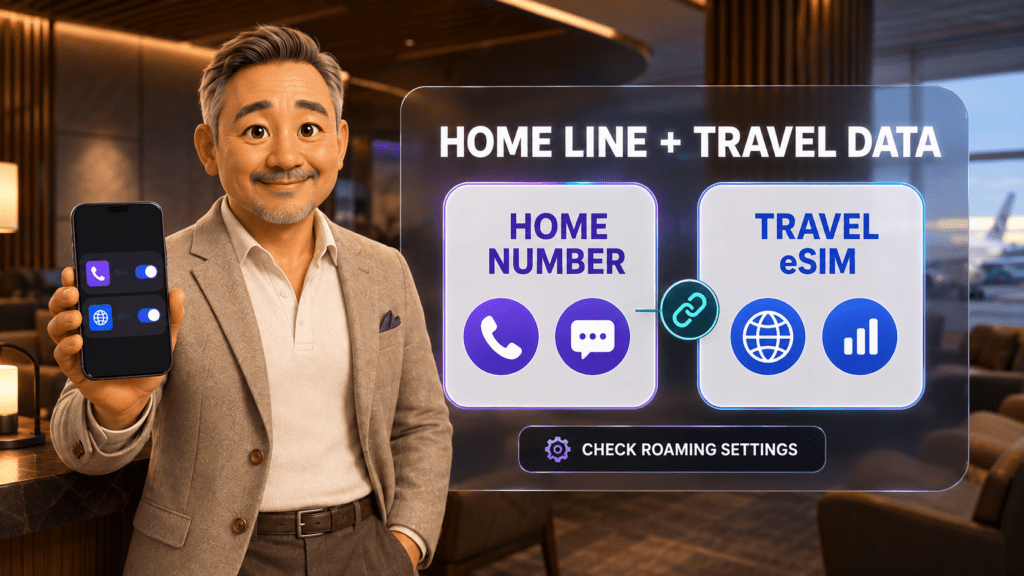
Use names such as “Home” and “Travel Data” in your phone settings. Clear labels reduce the chance of selecting the US carrier for international data by mistake.
4. Select the travel eSIM for mobile data
When you arrive, turn on the travel line and select it as the cellular data line. Follow the provider’s instructions for data roaming on that profile. Some travel eSIMs require data roaming to be enabled on the travel line because they connect through partner networks.
5. Confirm the home line settings
If the US line remains active, verify that it is not being used for mobile data. Your home carrier may still charge for calls, messages, or roaming activity. Apple specifically warns that keeping both lines active can still create roaming fees from the home eSIM.
Travel eSIM vs physical SIM vs carrier roaming
All three options can provide service abroad, but they solve the problem differently.
| Option | How it works | Main advantage | What to check |
|---|---|---|---|
| Travel eSIM | A digital plan is installed on a compatible device | No physical SIM swap and easy pre-trip setup | Device compatibility, unlocked status, coverage, validity, and plan inclusions |
| Local physical SIM | A removable SIM is purchased at the destination | Can include a local number and local carrier plan | Store availability, identity requirements, SIM size, and what happens to the home SIM |
| US carrier roaming | Your existing line connects through an overseas partner | Usually requires the fewest setup steps | Daily-pass fees, covered countries, high-speed data limits, and billing rules |
A travel eSIM is often the most flexible choice when you want to prepare before the flight, keep the physical home SIM in place, or switch between multiple destinations. Carrier roaming may be simpler for a short trip if it is already included in your plan. A local SIM can make sense for a long stay or when a local phone number is essential.
Can you keep your US number while using a travel eSIM?
Often, yes. Many recent phones support Dual SIM Dual Standby, which allows a home line and a travel line to remain active at the same time. The travel eSIM can handle mobile data while the US line remains available for calls and texts.
Apple says supported iPhones can use two active eSIMs, or a physical SIM and an eSIM on models with a SIM tray. Google explains that compatible Pixel phones let users choose separate defaults for data, calls, and messages.
That flexibility is useful, but it does not make the home line free abroad. Incoming calls, outgoing calls, SMS, voicemail activity, and background carrier behavior may be billed under the US carrier’s international policy. Before departure, confirm the rules with your carrier and decide whether the home line should stay fully active.
What should a US traveler check before buying?
Your phone supports eSIM
Compatibility depends on the exact device model, country of purchase, and carrier configuration. Apple lists iPhone XS, iPhone XS Max, iPhone XR, and later models as supporting travel eSIM use, with regional exceptions. Google documents Dual SIM support beginning with Pixel 3a, while features vary across later models.
Your phone is unlocked
An eSIM-compatible phone can still be locked to the carrier that sold it. Apple advises iPhone users to open Settings > General > About and look for “No SIM Restrictions” next to Carrier Lock. Android steps vary, so check with the device manufacturer or US carrier.
The plan covers every destination
Do not rely on the word “global.” Compare the actual country list with every stop, including layovers where you may need data. If a trip includes rural areas, also check which local networks the eSIM uses and whether the provider discloses expected network generation.
The validity period matches the trip
Some plans begin when the eSIM first connects to a supported network. Others begin at purchase or installation. A seven-day plan can be a poor fit for an eight-day trip, even when the data amount looks sufficient.
Hotspot use is allowed
If you plan to connect a laptop or share data with a colleague, confirm that tethering is supported. Also remember that video meetings and laptop updates can consume a small data bundle quickly.
How much does a travel eSIM cost?
Prices depend on destination, coverage footprint, validity, data allowance, network access, and whether calls or texts are included. The examples below are public global-plan prices checked on September 7, 2026.
| Provider | Example public plan | Price in USD | Important context |
|---|---|---|---|
| JotLink eSIM | 1 GB, 5 GB, 10 GB, or 25 GB; 30-day or annual validity | Not publicly listed | Coverage in 149 countries, plus business-focused eSIM and FMC options. Confirm the current quote before publishing or purchasing. |
| Airalo Discover | 1 GB for 7 days | $8.50 | Data-only global example covering 170 countries on the cited plan page. |
| Nomad Global | 1 GB for 7 days | $12.00 | Data-only global example. Coverage and networks should be checked against the itinerary. |
| Saily Global | 1 GB for 7 days | $8.99 | Global example covering 121 destinations according to the cited plan page. |
| Holafly Plans | 25 GB monthly global plan | Price shown in EUR on the cited page | A different subscription model, so it is not a direct comparison with seven-day 1 GB plans. |
These are examples, not a universal ranking. Taxes, promotions, billing currency, supported destinations, fair-use rules, and plan inventory can change. Open the provider page and verify the final checkout price for your exact trip.
How much travel data do you need?
The right amount depends less on trip length than on what the phone will actually do. Navigation and messaging are usually lighter than video calls, streaming, cloud backups, and laptop tethering.
| Travel pattern | Practical starting point | Typical use |
|---|---|---|
| Light use | 1 GB | Maps, messaging, email, boarding passes, and occasional browsing with hotel Wi-Fi available |
| Regular work trip | 5 GB | Daily email, CRM access, navigation, document review, and occasional audio calls |
| Heavy mobile work | 10 GB | Frequent app use, social media, cloud files, and several video meetings |
| Hotspot-dependent trip | 25 GB or more | Laptop tethering, frequent video calls, large uploads, and limited dependable Wi-Fi |
These ranges are planning guides, not guarantees. Review your phone’s recent cellular usage before buying. Turn off automatic photo backup, app updates, and high-resolution streaming if the allowance is limited.
How to set up a travel eSIM before your flight
- Confirm compatibility and unlock status. Check the exact model, not only the phone family.
- Compare the itinerary with the coverage list. Include connections and short stopovers.
- Read the activation rule. Learn when the validity clock starts.
- Install the eSIM on reliable Wi-Fi. Save the QR code and instructions somewhere accessible offline.
- Label the lines. Use “Home” and “Travel Data” or similarly clear names.
- Keep the home line as the calling line only if needed. Review its international charges first.
- Select the travel eSIM for cellular data. Disable automatic data switching if it could move data back to the home carrier.
- Test the setup. Confirm that the profile is installed, but follow the provider’s instructions about when to activate it.
Common travel eSIM mistakes
Buying the plan before checking whether the phone is unlocked
eSIM support and carrier unlock status are separate questions. Verify both before paying.
Activating a short plan too early
If validity begins immediately, an early activation can consume part of the plan before the trip starts. Read the activation terms first.
Leaving cellular data on the home line
A travel eSIM cannot prevent the phone from using the wrong line if the data settings are incorrect. Confirm the selected data line after arrival and after any restart.
Assuming data-only means ordinary calls and SMS are included
Internet calling and messaging apps can work over data, but carrier voice and SMS require the relevant service on one of the active lines.
Deleting the eSIM profile during troubleshooting
Some profiles cannot be installed again without provider support or a replacement code. Restart the phone, check the network and roaming instructions, and contact the provider before deleting the profile.
How JotLink eSIM fits business travel
JotLink eSIM and FMC are designed for teams that need more than temporary personal data. The current product page lists coverage in 149 countries, eSIM and physical SIM options, hotspot support, and 1 GB, 5 GB, 10 GB, and 25 GB bundles with 30-day or annual validity.
FMC stands for fixed-mobile convergence. In JotLink, it can link a mobile SIM with a JotLink business number so incoming business calls can ring on the mobile and outbound calls can display the business caller ID. That is a different benefit from an ordinary data-only travel eSIM: it helps preserve the company’s calling identity while an employee is away from the office.
JotLink does not currently display eSIM prices publicly on the product page. Confirm the available destinations, plan terms, device requirements, and current USD price before placing an order.
Frequently asked questions
Does a travel eSIM change my phone number?
A data-only travel eSIM does not normally replace the number on your home line. If both lines remain active, the original number can still receive supported calls and texts. Charges depend on the home carrier. Some travel plans include a separate number, but many do not.
Can I install a travel eSIM before leaving the United States?
Usually, yes, and installing it before departure is often safer because you have dependable internet access. However, confirm when the plan begins. Installation and activation are not always treated as the same event.
Should data roaming be on or off?
Follow the eSIM provider’s instructions. Many travel eSIMs require data roaming to be on for the travel profile because they use partner networks. Keep data roaming off for the home line unless your US carrier plan specifically covers the destination and you intend to use it.
Can I use a travel eSIM as a hotspot?
Many plans allow it, but not all. Check the provider’s terms. JotLink states that hotspot and tethering are supported on its eSIM service.
What happens when the plan runs out?
Depending on the provider, data stops, slows down, or can be replenished through a top-up. Check whether top-ups are available before the trip, especially if the plan will support work calls or laptop access.
The bottom line
A travel eSIM is a practical way to arrange mobile data abroad without finding a store or replacing a physical SIM. The best plan is the one that covers the whole itinerary, matches the trip length, works with the exact device, and makes its limits clear.
Install the profile before departure, label both lines, select the travel eSIM for data, and verify the home carrier’s roaming rules. Those four steps prevent most surprises.
If your company also needs a consistent business number, team SIM management, and data across multiple destinations, check JotLink eSIM coverage and choose a data bundle for your next trip.