An international team can share one project and still lose time to one small sentence. A warehouse employee writes in Spanish, a US coordinator reads English, and a vendor replies in French. Someone copies the conversation into a separate translator, removes the customer name, pastes the result back, and hopes the tone and numbers survived.
Automatic message translation moves that step into the business messenger. Each recipient can read a translated view in a preferred language while the original message remains available for context and verification.
This guide explains how automatic chat translation works, where it helps, where it can fail, which privacy questions to ask, how to introduce it safely, and how current US messaging products compare.
Short answer: Automatic message translation detects the source language of a chat message and displays a translated version in the recipient’s preferred language. It helps international teams move faster, but it should preserve the original text and provide a human verification path for prices, deadlines, legal terms, safety instructions, medical information, and other high-impact details.
What is automatic message translation?
Automatic message translation is a business-messaging feature that converts a message from its detected language into the language selected by the reader. Depending on the platform, translation may happen automatically, appear as a suggestion, or require the reader to choose “Translate.”
A useful implementation keeps three things separate:
- Original message: the exact text sent by the author;
- Translated view: the version generated for a particular recipient; and
- Language preference: the language into which that recipient wants messages translated.
The sender should not need to create several language versions, and one teammate’s translation should not overwrite the source seen by everyone else.
JotLink describes real-time chat auto-translation across 12 languages as a feature of its Messenger. The core Messenger is listed at $0 per user and also includes chats, groups, file sharing, voice and video calls, and business communication tools.
How automatic message translation works
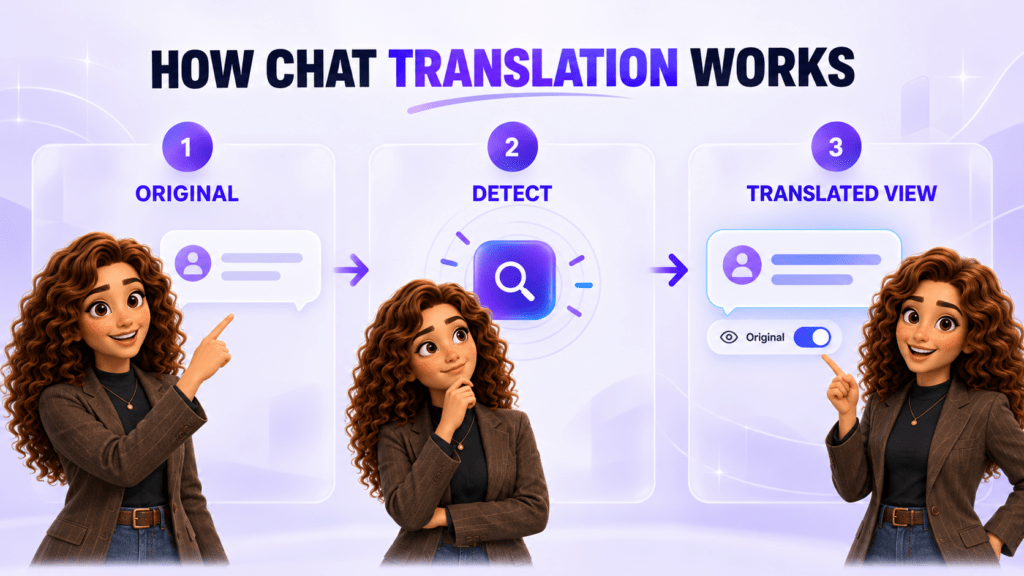
- A user sends a message. The source text remains part of the conversation record.
- The system detects the language. Very short messages, names, codes, and mixed-language text may be harder to classify.
- The reader’s preference is applied. The messenger translates into the language selected for that user or chat.
- A translated view appears. Good interfaces mark the message as translated instead of presenting generated wording as the original.
- The reader can view the source. A toggle or action reveals the original message when nuance, terminology, or a possible error needs review.
Platforms implement the workflow differently. Microsoft Teams can translate individual chat messages and lets users enable automatic translation by language. Google Chat can automatically translate into the language set in the user’s Google Account. Slack AI can translate selected messages into a configured language, with translations visible only to that reader.
Where translation creates the most value
Daily operational coordination
Short updates about delivery, inventory, appointment status, shift coverage, or task completion can move without waiting for a bilingual coordinator. Use consistent terms and structured details so dates, locations, quantities, and owners are easy to verify.
Distributed project teams
Teammates can participate in the same channel instead of splitting work into language-specific conversations that hide decisions from part of the group.
Customer and vendor handoffs
A US employee can read a message from an overseas customer or supplier, then route it to the correct person with the original attached. Translation helps with triage, but a qualified speaker should verify commitments and sensitive details.
Onboarding and internal announcements
Translated chat can make routine updates more accessible. Policies, employment documents, safety materials, and formal notices may still require approved professional translations.
Search and conversation history
When translation stays inside the work messenger, employees can review the original thread, files, decisions, and replies in one place instead of creating untracked copies in external tools.
What automatic translation does not guarantee
Fast translation is not the same as authoritative translation. Accuracy can change with context, language pair, sentence length, slang, spelling, industry terms, and the amount of surrounding conversation available.
- Names and product codes: the system may treat an identifier as ordinary language.
- Numbers and units: decimal separators, dates, times, currencies, and measurements may be interpreted differently.
- Negation: a small error around “not,” “unless,” or “except” can reverse meaning.
- Professional terminology: legal, medical, financial, technical, or safety terms may require approved wording.
- Tone: humor, politeness, urgency, and criticism do not always carry cleanly between cultures.
- Mixed-language messages: one sentence may contain English product terms inside another language.
- Short messages: words such as “fine,” “right,” or “charge” have several meanings without context.
The safest interface identifies translated content and preserves the source. The safest workflow defines which messages need a person to verify the intended meaning.
Set a verification rule for critical messages
Use automatic translation to accelerate understanding, then match the review requirement to the cost of an error.
| Message type | Recommended handling |
|---|---|
| Routine status update | Use the translated view and keep the original available |
| Date, address, quantity, or part number | Repeat the structured value and ask the other person to confirm |
| Price, refund, discount, or payment instruction | Verify the number, currency, conditions, and approval in a shared record |
| Contract, policy, legal notice, or employment term | Use approved professional translation and legal review where required |
| Medical, safety, or emergency instruction | Use an authorized human language resource and the organization’s formal protocol |
| Conflict, complaint, or sensitive customer message | Review the original and involve a fluent person before responding |
Privacy and security questions to ask
A message may contain customer names, employee information, account details, locations, commercial terms, or attachments. Treat translation as a data-processing step, not only a convenience feature.
- Which message content is sent to the translation service?
- Which company processes the text and in which locations?
- Is content stored after translation, and for how long?
- Is customer content used to train shared models?
- Are the original and translated versions encrypted in transit and at rest?
- Can administrators control translation by workspace, team, or user?
- Can the business export or delete original and translated content?
- Does retention apply equally to the source and translated view?
- Which audit records show that translation occurred?
- What happens when a language is unsupported or detection is uncertain?
Do not paste sensitive business content into an unapproved consumer translation tool simply because it is faster. Use the communication platform and vendors covered by the organization’s data policy.
How leading business messengers handle translation
JotLink Messenger
Approach: JotLink describes real-time chat auto-translation in 12 languages inside a free core business messenger.
Consider it when: the team wants translation connected with business chat, voice and video calls, Telephony, CRM, and other JotLink modules rather than a standalone translator.
Microsoft Teams
Approach: Teams supports manual and automatic translation for chat messages. Users can set a target language, choose automatic translation, and exclude languages they never want translated. Microsoft notes that automatic translation may not work for short messages and is available for Chat messages.
Consider it when: the business already uses Microsoft 365 and wants translation inside the same identity, chat, meeting, and file environment.
Google Chat
Approach: Google Chat can automatically translate messages into the preferred language set in the user’s Google Account. The translated view is private to that user, and the original remains accessible. Google states that the feature requires an eligible Google Workspace or Google AI plan.
Consider it when: the company works primarily in Gmail, Drive, Meet, and Google Workspace.
Slack
Approach: Slack AI lets a user set a translation language and translate selected messages. The translation is visible only to that user. Slack’s plan documentation lists AI language translations with Business+ and Enterprise+.
Consider it when: the team needs a broad app ecosystem and can justify the plan that contains the required AI translation feature.
Current US pricing examples
Translation availability differs by plan and interface. The prices below are starting points, not equivalent bundles.
| Provider | Public US starting point | Translation context |
|---|---|---|
| JotLink Messenger | $0 per user for the core Messenger | JotLink describes real-time chat auto-translation across 12 languages. |
| Microsoft Teams Essentials | $4 per user per month paid yearly | Teams supports manual and automatic chat-message translation. Verify availability for the chosen identity and license configuration. |
| Google Workspace Business Starter | $7 per user per month on annual commitment | Automatic Translation requires an eligible Google Workspace or Google AI plan. Confirm that the selected edition is eligible before purchase. |
| Slack Business+ | $15 per user per month annually or $18 monthly | Slack lists AI language translations in Business+ and Enterprise+. Temporary promotions may show a lower initial price. |
Prices and feature documentation were checked on official US pages on September 17, 2026. Taxes, promotions, contract terms, AI entitlements, administrator settings, and regional availability may change the final configuration.
How to introduce automatic translation to a team
- Choose one workflow. Start with a multilingual project, supplier channel, or internal operations group.
- Confirm supported languages. Test the exact language pairs used by the team, including mixed-language messages.
- Set user preferences. Let each teammate choose a reading language rather than forcing one translated version on the whole channel.
- Create a writing rule. Use short complete sentences, explicit dates, named time zones, currency codes, and consistent product terms.
- Preserve the original. Make sure every translated view can return to the source message.
- Define critical categories. List the messages that require confirmation or professional translation.
- Test difficult examples. Include abbreviations, product codes, negation, dates, quantities, slang, and domain terminology.
- Collect corrections. Keep an approved glossary for recurring names and terms, and report systematic errors.
- Review privacy. Document the processor, retention, access, and training controls before sensitive content is included.
Writing practices that improve translated team chat
- Use one date format with the month written out when ambiguity matters.
- Include a time zone, such as 3:00 PM ET, for cross-border scheduling.
- Write currency codes, such as USD or CAD, beside important amounts.
- Keep product names, model numbers, addresses, and account identifiers on separate lines.
- Avoid unexplained idioms, sarcasm, and local abbreviations.
- Use numbered questions when the recipient must answer several items.
- Ask for an explicit confirmation of safety, legal, payment, or delivery details.
- Correct the original message when possible instead of sending several conflicting corrections.
How to evaluate translation quality
Build a small test set from authorized, non-sensitive examples. Have fluent reviewers compare meaning, terminology, numbers, tone, and required action.
| Test | What to check |
|---|---|
| Routine update | Does the translated message preserve the task, owner, and status? |
| Number-heavy message | Are dates, quantities, prices, units, and time zones unchanged? |
| Industry terminology | Are approved product and process terms used consistently? |
| Negation and condition | Are words such as not, unless, only, and except preserved? |
| Mixed-language text | Do names and English product terms remain intact? |
| Short message | Does the system admit uncertainty or preserve the original clearly? |
| Sensitive scenario | Does the workflow require the correct human review? |
Track corrections by language pair and message category. A single global “accuracy” score can hide a recurring problem with one team, term, or workflow.
Common implementation mistakes
- Hiding the original: employees cannot investigate a strange or risky translation.
- Assuming every language pair performs equally: test the pairs the business actually uses.
- No rule for critical content: employees treat a convenient translation as an approved legal or safety translation.
- Ignoring privacy: messages are copied into an unapproved external tool.
- Translating jargon instead of fixing it: unclear source writing remains unclear in another language.
- Forcing one team language: the feature helps some users while making the workflow harder for others.
- No correction loop: recurring product names and terms remain inconsistent.
Frequently asked questions
Is automatic chat translation accurate enough for business?
It is useful for routine understanding and coordination, but accuracy varies. Preserve the original and require human verification for high-impact content.
Can each employee choose a different language?
Many platforms apply translation as a private user view, so one employee can read English while another reads Spanish or French. Confirm how the selected product handles workspace and user preferences.
Does translation change the original message?
A well-designed business messenger keeps the original and displays a translated version. The reader should be able to switch back to the source.
How many languages does JotLink Messenger support for translation?
JotLink currently describes chat auto-translation across 12 languages. Confirm the exact supported language list for the team’s workflow before rollout.
Is automatic translation included in free messaging software?
It depends on the vendor. JotLink lists its core Messenger at $0 per user with chat auto-translation. Slack lists AI language translation in Business+ and Enterprise+, while Google requires an eligible Workspace or AI plan.
The bottom line
Automatic message translation can remove a daily barrier for international teams without forcing every employee to write in the same language. Its value comes from speed, shared context, and keeping the work inside the business conversation.
Use it with a simple rule: translate for speed, preserve the original, and verify the details that carry real risk.
Start with JotLink Messenger free and test automatic translation in one multilingual team workflow.