When smart call routing sends a caller to the wrong department, the problem is rarely the transfer button. It usually starts earlier: the phone system asks the wrong question, applies an outdated schedule, ignores which number the customer called, or sends the call to a team that is not available.
Smart call routing fixes this by combining several signals before choosing a destination. Those signals can include the caller’s intent, the dialed number, business hours, service location, language, customer history, agent skills, and current availability. The goal is not a complicated phone tree. It is a short, documented path with a safe fallback when the system is uncertain.
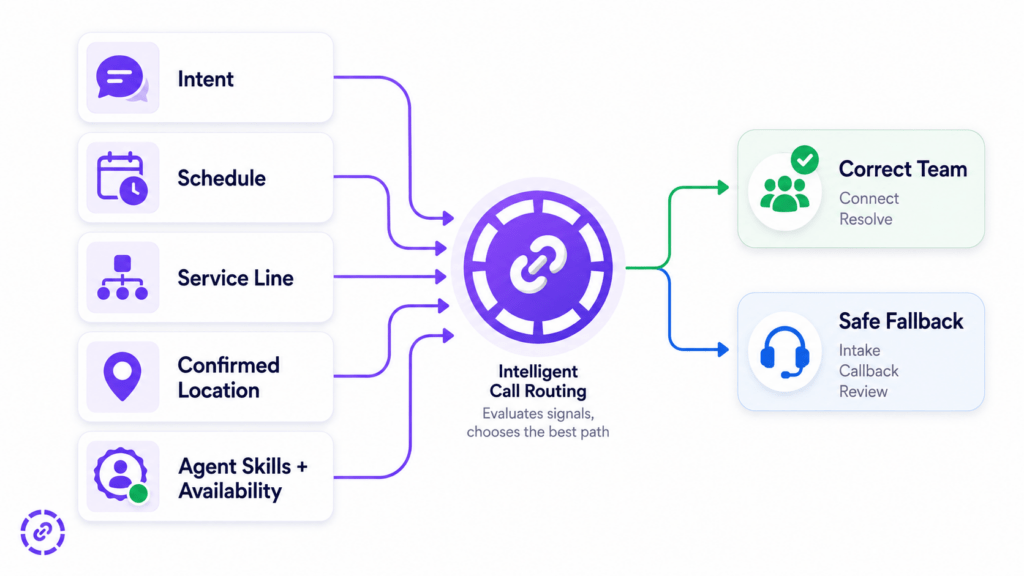
HOW SMART CALL ROUTING USES FIVE SIGNALS
A department name alone is not enough to route a call well. “Support” might mean technical troubleshooting, an appointment change, a billing dispute, or an urgent service interruption. The system needs enough context to match the request with a team that can act on it now.
Routing signal: Intent
What it tells the system: Why the person is calling
Example destination: Sales, billing, technical support, scheduling
Safe fallback: Ask one clarifying question or send to trained intake
Routing signal: Schedule
What it tells the system: Which teams are open now
Example destination: Day team, after-hours coverage, holiday message
Safe fallback: On-call route, voicemail, callback, or AI intake
Routing signal: Dialed number or service line
What it tells the system: Which location, product, or campaign the caller selected
Example destination: Toronto office, installation line, existing-customer support
Safe fallback: Main intake team with the called number attached
Routing signal: Customer or service location
What it tells the system: Where service is needed
Example destination: Local branch, territory, licensed service area
Safe fallback: Confirm postal code or service address
Routing signal: Skills and availability
What it tells the system: Who can solve the request and take the call
Example destination: Qualified, signed-in agent or queue
Safe fallback: Overflow team, callback, or message with context
The order matters. Start with the most reliable signal that the caller has already provided. If a customer called a dedicated billing number, do not make them select billing again. If the request is unclear, confirm it before sending the call into a long queue.
WHY CALLS ARE ROUTED TO THE WRONG DEPARTMENT
Misrouting usually comes from a mismatch between how customers describe a need and how the company has organized its phone system.
The menu uses internal language
Customers do not always know whether an appointment change belongs to operations, customer success, or service coordination. They choose the option that sounds closest, then the first employee has to transfer them.
Microsoft’s current call-flow guidance recommends using terminology callers understand, putting common choices first, and keeping menu items to five or fewer. That is useful even when voice recognition replaces keypad options. The spoken prompt still needs to describe recognizable customer needs.
The routing rules ignore time
A route can be correct at 11 a.m. and wrong at 7 p.m. If a department is closed, sending a caller to its empty queue creates a delay rather than a solution. Lunch coverage, split shifts, weekends, holidays, and regional time zones all need explicit rules.
Every number enters the same generic flow
Businesses often publish different numbers for locations, campaigns, or services but send all of them to one identical menu. That discards a strong signal. The number the customer called can identify the intended location or service before the conversation begins.
The directory does not match the real team
Employees change roles, cover other locations, go on leave, or stop handling a particular service. If queue membership and skill assignments stay unchanged, the system keeps offering calls to people who cannot resolve them.
The route checks the department but not availability
Sending a call to the correct team is only half the job. The system also needs an outcome when nobody is signed in, the queue is full, or the maximum wait is reached. Without an overflow rule, the caller may land in voicemail without knowing why.
Transfers discard the original context
Even a necessary transfer feels like misrouting when the next employee does not know the caller’s name, request, urgency, or previous answers. A good handoff carries the reason for the call with it.
START WITH INTENT, NOT THE ORG CHART
Intent is the outcome the caller wants. It is usually more useful than the department the caller thinks they need.
Instead of asking, “Which department do you want?”, ask the system to distinguish customer-facing requests such as:
Get a quote or discuss a new project.
Change an existing appointment.
Ask about an invoice or payment.
Report a technical problem.
Check an order or service status.
Reach a specific employee.
These categories can be collected through a short keypad menu, a voice menu, or a natural-language conversation. Twilio’s skill-based routing documentation shows the underlying pattern: the IVR attaches a requirement such as Sales or Support, then a workflow sends the interaction to a queue whose agents have the matching skill.
Do not pretend every request is obvious. “I need help with my account” could refer to access, billing, or cancellation. The safe response is one clarifying question, not a confident guess. High-risk or low-confidence requests should go to trained intake rather than an automated destination that cannot recover.
This article focuses on operational routing design. The later JotLink article about AI call triage will cover how AI separates sales, support, billing, and urgent requests in more depth.
ADD SCHEDULES BEFORE ADDING MORE MENU OPTIONS
Schedule logic decides which destinations are valid at the moment the call arrives. It should run before the system offers a route that may be closed.
Microsoft’s auto-attendant setup documentation supports separate business-hours, after-hours, and holiday call flows, including time-zone settings and multiple daily time ranges. The same planning principle applies to a small-business phone system: define open, closed, and exception periods for each public number.
A schedule map should answer:
Which queue or group receives calls during normal hours?
What changes during lunch, evenings, and weekends?
Which holidays use a special greeting or destination?
Is there an on-call employee for defined urgent requests?
What happens when the scheduled person does not answer?
After-hours routing should not promise unavailable service. It can state the current hours, collect a message, offer a callback, route a permitted urgent request, or use a conversation-first AI receptionist to capture the caller’s need and next step. The detailed answer-book-escalate playbook belongs to the separate after-hours article in this series.
USE LOCATION SIGNALS CAREFULLY
“Location” can describe several different things: the branch the customer called, the address where service is needed, the customer’s account territory, or the language and time zone of the team that should answer. Treat these as separate fields.
The most reliable location signal is often the number dialed. A dedicated local or service number can map directly to a branch, product line, or campaign. If the call concerns field service, ask for a postal code or service address before choosing a territory. If the customer is known, a current CRM record may identify the assigned branch or account owner.
Do not treat a caller’s area code as proof of current location. The FCC explains that customers can keep an existing number when changing providers, so the number should be one clue rather than the only routing rule. Confirm the service location whenever location changes eligibility, travel time, language coverage, or the next action.
For a multi-location company, a clean rule might be:
1. Use the dialed number to suggest a branch.
2. Confirm the service city or postal code when the request depends on territory.
3. Check whether that branch is open and staffed.
4. Route to the correct skill group.
5. Use a shared overflow team if the local group cannot answer.
MATCH THE REQUEST TO SKILLS AND AVAILABILITY
A department is an administrative label. A skill describes what an employee can actually handle. Routing by skill becomes useful when several teams overlap or when a request requires language, product, certification, account tier, or escalation experience.
AWS documentation on queue-based routing describes matching contacts to agents through queues and routing profiles based on criteria such as agent skills. Microsoft’s skill-matching documentation also separates exact and closest matches while considering representative capacity and presence.
For a small team, keep the model simple. Useful skills might be New Sales, Existing Customer, Billing, Scheduling, English, French, or Product A. Assign only the skills people genuinely handle, and give one owner responsibility for keeping membership current.
Availability must be part of the decision. A correct skill match is not useful if the employee is signed out or already at capacity. AWS contact-flow guidance describes checking queue staffing or availability before transferring a contact and using queue metrics to select another destination.
The fallback should preserve the intent. A billing call that overflows should remain labeled Billing when it reaches a shared intake team, callback list, or voicemail. Otherwise the next person starts the diagnosis again.
Image: Five-signal routing matrix showing intent, schedule, service line, location, and agent availability
BUILD A ROUTING DECISION TABLE BEFORE CONFIGURING THE PHONE SYSTEM
A decision table makes hidden assumptions visible. Start with the most common requests, then document the normal destination and every exception.
Caller need: New quote
Primary signal: Spoken intent or sales menu choice
Normal destination: Available sales group
Closed or unavailable: Qualified intake or callback
Context to pass: Service requested, location, timing
Caller need: Existing appointment change
Primary signal: Account match plus intent
Normal destination: Scheduling team
Closed or unavailable: Self-service option or message
Context to pass: Customer name, appointment, requested change
Caller need: Invoice question
Primary signal: Intent plus customer record
Normal destination: Billing queue
Closed or unavailable: Billing callback
Context to pass: Account, invoice reference, question
Caller need: Technical problem
Primary signal: Product plus issue type
Normal destination: Matching support skill
Closed or unavailable: Overflow support or scheduled callback
Context to pass: Product, symptoms, urgency, steps tried
Caller need: Named employee
Primary signal: Directory choice or CRM owner
Normal destination: Employee extension
Closed or unavailable: Delegate, team, or voicemail
Context to pass: Caller identity and reason
These are illustrative routes, not universal rules. Remove any field your team does not need. Add a manual-review path where a wrong automated decision could create a safety, privacy, legal, or customer-impact risk.
THREE PRACTICAL ROUTING WORKFLOWS
Multi-location home-services company
A caller asks for a repair. The system captures the service type and postal code, checks which territory serves the address, then looks at the local schedule. During open hours, it routes to the matching dispatch group. If that group is unavailable, it offers a callback or sends the request to shared intake with the service type and location attached.
Professional-services firm
The main number first separates new inquiries, current-client matters, billing, and named employees. New inquiries go to intake rather than directly to a specialist. Current-client calls use the CRM owner when that information is current, with a team fallback when the owner is unavailable. Billing remains a separate route so operational questions do not interrupt client-service work.
Product support team
The system identifies the product and broad issue before choosing a queue. It checks whether trained agents are available, then routes to the matching support skill. If no match exists, it uses a documented overflow team instead of sending the caller to sales. The handoff includes product, issue, customer identity, and any troubleshooting already completed.
FIND THE ROUTING FAILURES IN YOUR OWN CALL DATA
Do not redesign the flow from opinions alone. Review a representative sample of call records and transfers from normal and busy periods. Look for patterns such as:
Calls transferred within the first minute.
Calls transferred more than once.
Destinations that immediately transfer most reviewed calls elsewhere.
Menu selections that do not match the customer’s stated need.
Calls entering a closed or unstaffed destination.
Repeated requests for information the caller already provided.
Fallback calls with no intent or context attached.
Create a simple internal measure called first-touch routing accuracy:
Correctly routed reviewed calls divided by all reviewed calls, multiplied by 100.
Define “correctly routed” before measuring. For example, a call may count as correct when the first human recipient can own the next step without a corrective transfer. This is an internal diagnostic, not an industry benchmark. Pair it with transfer reasons, wait time, abandonment, and resolution data so one number does not hide a different problem.
If customer history influences routing, keep the record current. JotLink’s AI CRM and unified communication history can connect calls, messages, and ownership information, but routing rules still need a fallback for missing or outdated data.
A 30-DAY ROLLOUT THAT KEEPS THE FLOW MAINTAINABLE
Week 1: Map actual demand
Review call reasons, current transfers, schedules, service lines, and team ownership. Choose a small set of customer-facing intent categories. Do not recreate every internal department in the menu.
Week 2: Write rules and fallbacks
For each intent, document the normal destination, schedule exceptions, required location information, eligible skills, and final fallback. Draw the complete path, including silence, invalid input, unavailable agents, and transfer failure.
Week 3: Test one number
Launch on one service line or location. Test from an outside phone during open hours, after hours, and a temporary closed period. Test ambiguous language, a known customer, an unknown customer, a busy queue, and no-agent conditions.
Week 4: Review and simplify
Inspect misroutes, transfers, fallback volume, and employee feedback. Fix labels or stale assignments before adding more branches. Expand only after the first flow behaves predictably.
For the underlying tools, read the JotLink comparison of call queues, ring groups, and IVR. That guide explains which mechanism should handle each stage; this article explains what information should drive the route.
SMART ROUTING SHOULD REDUCE GUESSES, NOT ADD COMPLEXITY
The right routing flow starts with the caller’s need, removes destinations that are closed or unavailable, uses location only when it changes the next step, and matches the remaining request to a qualified team. When the data is incomplete, it asks a short clarifying question or uses a safe fallback.
If your current phone flow relies on a static menu and manual transfers, explore the JotLink AI Business Phone System for intent-aware answering, Smart IVR, dedicated service lines, time-based routing, queues, ring groups, overflow rules, and call reporting.
FREQUENTLY ASKED QUESTIONS
What is smart call routing?
Smart call routing uses more than one rule to choose a destination. It can combine caller intent, the number dialed, schedule, service location, customer history, agent skills, availability, and fallback conditions.
Why do callers choose the wrong IVR option?
Options may use internal department names, overlap with one another, omit the caller’s actual need, or remain available when the destination is closed. Use customer-facing language, keep the menu short, and confirm ambiguous requests.
Should calls be routed by area code?
Area code can be a clue, but it should not be the only proof of service location. Prefer the number dialed, a caller-confirmed postal code or address, and current CRM territory data when location affects the destination.
What should happen when smart routing is uncertain?
Ask one clarifying question when possible. If confidence remains low or the request carries meaningful risk, route the call to trained intake or manual review with the information already collected.
SOURCES
Microsoft Learn: Design call flows for Auto Attendant and Call Queue: https://learn.microsoft.com/en-us/microsoftteams/aa-cq-design-call-flows
Microsoft Learn: Set up an Auto Attendant: https://learn.microsoft.com/en-us/microsoftteams/aa-cq-setup-auto-attendant
Microsoft Learn: Skill matching in unified routing: https://learn.microsoft.com/en-gb/dynamics365/customer-service/administer/set-up-skill-based-routing
Twilio: Configure skill-based routing: https://www.twilio.com/docs/flex/onboarding-guide/configure-skill-based-routing
AWS: Queue-based routing: https://docs.aws.amazon.com/connect/latest/adminguide/concepts-queue-based-routing.html
AWS: Manage contacts in a queue: https://docs.aws.amazon.com/connect/latest/adminguide/queue-to-queue-transfer.html
FCC: Porting and keeping a phone number: https://consumercomplaints.fcc.gov/hc/en-us