A predictive dialer is designed for live conversations. It places multiple call attempts and connects answered calls to available employees. A broadcast dialer is designed to deliver a prerecorded message or a defined response flow across a contact list. It may also offer a path to a live employee when the campaign and staffing plan support that option.
JotLink offers these two outbound dialing modes: Predictive Dialer and Broadcast Dialer. Choosing between them should begin with the outcome you need, not the number of calls you want to place.
What Is the Quick Answer?
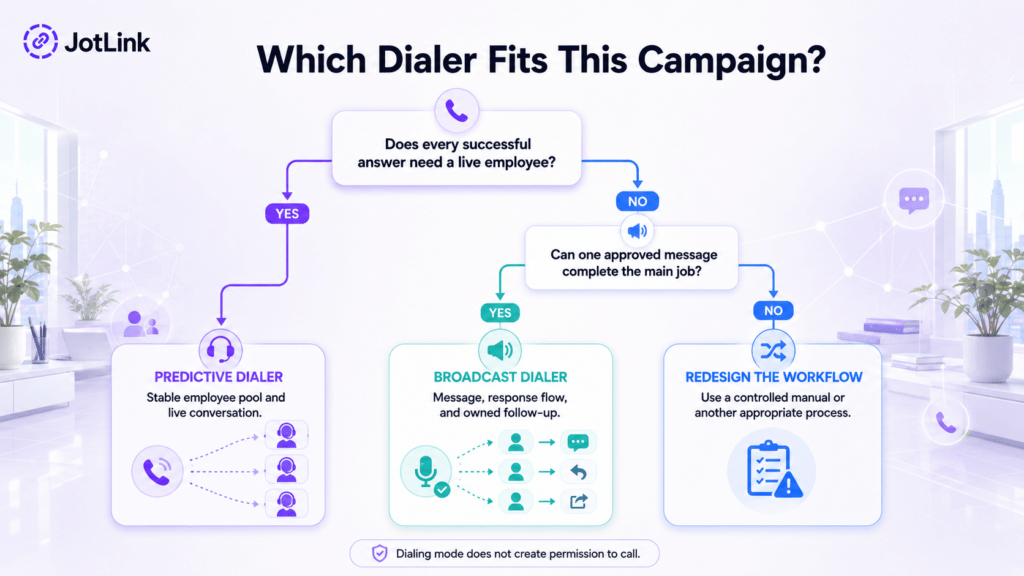
Use Predictive Dialer when every successful answer should become a live conversation with an available employee. Use Broadcast Dialer when the same approved message or interactive response flow should reach many recipients without requiring a live employee on every answer.
Choose Predictive when:
- A live employee must handle each answered call.
- The conversation follows a repeatable opening or qualification path.
- A stable group of trained employees is continuously available.
- The system can control connection timing and abandoned-call risk.
Choose Broadcast when:
- The core message is materially the same for the whole list.
- The campaign can be completed through a message, keypad response, spoken response, or defined transfer option.
- The business uses an approved audience and current suppression lists.
- Every response, callback, transfer, and opt-out has an owner.
The dialing mode does not make a contact list ready to call. Before launch, the campaign owner should separately check the list source, contact permissions, suppression lists, calling schedule, caller identification, message content, response handling, and the rules that apply to the recipients.
What Does a Predictive Dialer Do?
A predictive dialer estimates how many numbers to call for the available employee pool. Instead of asking one employee to wait through every ring, busy signal, unavailable number, or voicemail, the system places several attempts and connects a live answer to an available employee.
Google Cloud’s predictive-campaign documentation describes a dialing ratio that adjusts according to connected contacts and available agents. The concept is useful, but the ratio must be controlled. If more people answer than the team can handle, the campaign can create silence, delay, or abandoned calls.
JotLink’s AI Business Phone System describes Predictive Dialer as a mode that calls multiple numbers and connects answered calls to available employees. Campaign administrators select the employee pool, contact list, and dialing configuration, then monitor the campaign results.
The employee should receive the contact record, campaign purpose, approved opening, and any essential warnings as soon as the call connects. The employee then completes the conversation and records a clear outcome before becoming available again.
What Does a Broadcast Dialer Do?
A broadcast dialer automatically calls a contact list and delivers one approved message or response flow. Depending on the configuration, a recipient may hear a prerecorded message, confirm information, select an option, request a callback, or transfer to a live destination.
JotLink describes its Broadcast Dialer as a campaign tool that can call an uploaded list with a prerecorded message or a live-agent connection. Administrators can set a campaign schedule, retry rules, and simultaneous-call limits, then review answer, completion, and failure information.
Broadcast does not mean careless mass calling. A useful campaign identifies the sender, explains the purpose quickly, gives the recipient an appropriate response path, and respects every applicable opt-out requirement. If the message offers a live transfer, someone must be ready to answer.
The message should also fit the campaign. An appointment reminder can ask the recipient to confirm or reschedule. A service interruption notice can explain what happened and where to find updates. Keep operational notices focused on their stated purpose instead of adding an unexpected sales pitch.
How Does the Predictive vs Broadcast Dialer Comparison Work?
| Decision factor | Predictive Dialer | Broadcast Dialer |
|---|---|---|
| Primary job | Create live conversations for an available employee pool | Deliver one approved message or response flow to many recipients |
| What happens after an answer | The system connects the person to an available employee | The system plays the message and may collect or route a response |
| Employee requirement | Employees must be continuously available during active dialing | No employee is required for a message-only answer; transfers require coverage |
| Best workflow fit | Repeatable live outreach, qualification, follow-up, or surveys led by employees | Reminders, notices, confirmations, status updates, and approved announcements |
| Main experience risk | Dead air, delayed connection, or abandonment if employee capacity is misjudged | An unclear, unwanted, or poorly timed recorded message |
| Main operational risk | The dialing ratio continues after employee availability drops | Responses and live-transfer requests arrive without an owned workflow |
| What success looks like | Fast connection to prepared employees and useful completed outcomes | Accurate delivery, clear responses, honored preferences, and completed follow-up |
The predictive dialer vs broadcast dialer choice is therefore a choice between two kinds of work. Predictive creates an immediate live conversation. Broadcast delivers a consistent message and collects the next action.
When Is Predictive Dialer the Better Choice?
Predictive Dialer fits a campaign that needs many live conversations and has enough trained employees to handle them. The dialing process should be repeatable, while the employees remain responsible for listening, responding, qualifying, resolving, and recording the outcome.
Good operational candidates may include an approved lead follow-up list, a structured customer survey conducted by employees, renewal outreach, or a large callback campaign. The campaign owner should document why each contact is included before the list is activated.
Predictive Dialer works best when most of these statements are true:
- Several employees will remain signed in and available.
- Average conversation length is reasonably predictable.
- The opening and disposition process are consistent.
- The contact record can appear immediately when a call connects.
- The system pauses or reduces dialing when employee capacity changes.
- Administrators monitor connection delay and abandoned calls during the campaign.
A predictive campaign is a poor fit when only one employee is available intermittently, when each record needs detailed preparation, or when call lengths vary so widely that employee availability is difficult to forecast. In those cases, use a controlled manual or click-to-call workflow instead of forcing predictive behavior onto the team.
When Is Broadcast Dialer the Better Choice?
Broadcast Dialer fits a campaign where the main information is consistent across the list. The business should be able to explain why recipients need the message, what they can do next, and who owns any resulting response.
Practical examples may include:
- Appointment reminders with confirm or reschedule options
- Office closure or schedule-change notices
- Service interruption and restoration updates
- Delivery or pickup notifications
- Event reminders for properly authorized recipients
- Customer status updates with a callback option
Broadcast is a poor choice when every recipient has a different problem, when the message requires negotiation, or when a recording would make a sensitive situation feel impersonal. A debt dispute, complaint, complex account change, or urgent personal matter may require a live employee from the start.
Do not turn an operational message into an unexpected promotion. The audience, purpose, script, and response options should stay aligned from list approval through launch.
Which Dialer Fits Common Business Scenarios?
Lead qualification campaign
Choose Predictive when a trained employee must ask questions, understand answers, and decide the next step. Use a stable employee pool and show the source and context of the lead as soon as the call connects.
Appointment reminders
Choose Broadcast when each authorized recipient needs the same reminder and can confirm, reschedule, or request help through a defined response. Route rescheduling requests to an owned calendar workflow.
Service interruption notice
Choose Broadcast when the same factual update applies to a verified group. Identify the business immediately, keep the message focused, and provide a reliable source for continuing updates.
Customer callback list
Choose Predictive when employees must speak with each person and resolve an individual request. Do not include people who already completed the callback through another channel.
Interactive announcement
Choose Broadcast when the message can collect a simple response such as confirm, decline, reschedule, or connect. Test every branch and make sure transfers do not send recipients into an unstaffed queue.
What Must Be Ready Before a Campaign Starts?
1. A precise campaign purpose
Write one sentence explaining why the recipient is being called. Separate sales, reminders, account service, collections, surveys, and emergency notices. Combining purposes can confuse the recipient and make the campaign harder to approve, measure, and manage.
2. A traceable list source
Record where each phone number came from, when it was collected, which business and communication channel it covers, and whether the person later asked not to be contacted. A phone number in a spreadsheet is not a complete contact record.
3. Current suppression controls
Apply the suppression lists required by the organization and the applicable calling rules before import. Keep a person’s contact preference attached to the record when a new list is uploaded or another employee launches a campaign.
4. Honest caller identification
Use an approved business number and clearly identify the responsible organization. Make sure the displayed or announced callback number reaches a monitored destination that can process questions and contact-preference requests.
5. Capacity and fallback rules
For Predictive, define how dialing changes when employees sign out or call duration increases. For Broadcast, define what happens when someone requests a transfer, calls back, chooses an invalid option, or reaches the campaign after hours.
6. A tested message and employee opening
Test the actual audio, pacing, pronunciation, disclosure, response options, transfers, voicemail behavior, and opt-out mechanism. For Predictive, test how quickly the contact record appears and what the employee hears before connection.
7. Complete outcomes
Use a short, useful set of campaign outcomes. Examples include connected, confirmed, rescheduled, follow-up required, no answer, voicemail, invalid number, wrong party, completed, and do not call. Define which results permit another attempt and when.
What Should You Measure After Launch?
Do not judge either dialer only by attempts per hour. More attempts can still create poor conversations, unanswered transfer requests, duplicate retries, and complaints.
For Predictive Dialer, monitor:
- Attempts, live answers, and employee connections
- Time from the person’s answer to employee connection
- Answers that did not reach an employee successfully
- Employee availability during active dialing
- Completed conversations and meaningful outcomes
- Wrong-party calls, invalid numbers, complaints, and contact-preference requests
For Broadcast Dialer, monitor:
- Attempts, answers, message starts, and completed messages
- Responses by option
- Live-transfer requests and transfer wait time
- Callbacks and unresolved requests
- Opt-outs, complaints, invalid numbers, and wrong-party outcomes
- The business result, such as confirmed appointments or acknowledged notices
Review call recordings only where recording and analysis are permitted and properly disclosed. JotLink’s guide to a practical call-recording QA workflow explains how to sample evidence, score consistently, coach employees, and check later calls. The separate AI Call Analytics product page describes summaries, KPIs, QA scoring, and coaching outputs from selected recorded calls.
How Can Teams Keep Campaign Controls Current?
Calling requirements vary by location, audience, purpose, message, and technology, and they can change over time. For that reason, this article does not translate regulations into universal dialer settings or tell a reader that a particular campaign is permitted.
In the United States, use the Federal Trade Commission’s Telemarketing Sales Rule guide and the Federal Communications Commission’s robocall and robotext consumer guide as starting points. In Canada, use the CRTC’s key Unsolicited Telecommunications Rules and the full CRTC rules. These are official sources, but each organization remains responsible for determining which requirements apply to its own campaigns.
A practical internal process is to assign one campaign owner, record the source and purpose of every list, maintain suppression records, approve the script and caller identity, define calling windows, test opt-out and transfer paths, and keep the campaign history. Recheck the official sources whenever the audience, purpose, message, technology, or destination changes.
What Mistakes Cause the Most Trouble?
Using Predictive with an unstable employee pool
If employees frequently sign out, take unrelated inbound calls, or handle conversations of very different lengths, the system has less reliable capacity. Reduce or pause dialing when availability changes.
Using Broadcast for a message that needs empathy
A recorded flow cannot responsibly handle every complaint, dispute, exception, or urgent personal situation. Use a live workflow when the recipient is likely to need explanation or judgment.
Uploading a list without source records
A purchased or shared list does not show how each contact was collected or whether preferences are current. Require its source, collection date, intended purpose, responsible business, and suppression history before import.
Offering a transfer without coverage
A Broadcast message that says “press 1 to speak with us” creates an expectation. Connect that option only during staffed hours, use a queue with an honest wait experience, or offer a callback instead.
Measuring activity instead of outcomes
Attempts and answer rates do not show whether the right person received the right message, the conversation completed its purpose, or preferences were honored. Measure the business result and the follow-up burden.
Forgetting the second half of the campaign
The work continues after automated dialing stops. Assign ownership for callbacks, transfers, opt-outs, wrong-party reports, disputes, rescheduling, and unresolved requests.
Frequently Asked Questions
What is the main difference between Predictive and Broadcast Dialer?
Predictive Dialer aims to connect answered calls to available employees for live conversations. Broadcast Dialer delivers a prerecorded message or response flow and does not require a live employee on every answer unless the campaign offers a transfer.
Can Broadcast Dialer connect a recipient to an employee?
Yes, JotLink describes Broadcast campaigns that can use a prerecorded message or a live-agent connection. Any transfer option needs sufficient staffing, queue behavior, calling-hour controls, and a fallback when nobody is available.
Can a small team use Predictive Dialer?
It may be technically possible, but a small or inconsistent employee pool has less capacity to absorb simultaneous answers. Use conservative settings and switch to a controlled manual or click-to-call workflow when stable coverage cannot be maintained.
Does choosing a dialer make a contact list ready to call?
No. The dialer controls how calls are placed and handled. The campaign owner must separately approve the list source, audience, purpose, script, schedule, caller identity, response path, suppression process, and any rules that apply.
Which dialer is better for appointment reminders?
Broadcast Dialer is generally the better workflow fit when authorized recipients need the same reminder and can confirm, reschedule, or request help. Predictive Dialer fits when every answered call should become a live employee conversation.
Which Dialer Should You Test First?
Begin with the outcome. In a predictive vs broadcast dialer choice, use Predictive Dialer when success requires a live conversation and use Broadcast Dialer when success means delivering one approved message or collecting a simple response. Test either mode with complete connection, transfer, callback, and opt-out handling.
Start with a small, verified list. Review customer experience and completed outcomes before increasing volume. The right dialer is the one that finishes the intended job without creating unmanaged calls or unwanted contact.
Explore JotLink’s AI Business Phone System to review Predictive Dialer, Broadcast Dialer, campaign management, business caller ID, call reporting, and the wider outbound calling workflow.
Updated for source accuracy: September 3, 2026.
Sources
- JotLink, AI Business Phone System
- Google Cloud, Predictive campaigns
- Federal Trade Commission, Complying with the Telemarketing Sales Rule
- Federal Communications Commission, Consumer Guide to Robocalls and Robotexts
- Canadian Radio-television and Telecommunications Commission, Key Unsolicited Telecommunications Rules
- Canadian Radio-television and Telecommunications Commission, Full Unsolicited Telecommunications Rules